We released a couple of updates in close succession in the last few days. These updates include minor fixes but we thought it was necessary to release them immediately because they improve the stability of the client.
Most notably we fixed a problem with reading the commands from the chat, a MTGO crash at the login screen, a problem with the classified messages resulting in posted selling prices instead of buying price (and viceversa: buying prices posted, instead of selling prices) and a problem in loading the collection.
As you can see, these are small and "not core" issues but we preferred to release them immediately instead of waiting the next big update.

Showing posts with label collection. Show all posts
Showing posts with label collection. Show all posts
Friday, July 10, 2015

Thursday, April 16, 2015
MTGO Library Bot 9.56
ML Bot 9.56 has just been released!
The main and most important change is that we re-coded from scratches the way the bot sends its collection data to the mtgolibrary.com server. The old communication system has been effective for years but it was starting to show its limit and we needed to fix it. The new communication system is faster, more reliable and lighter on the server - this results in an overall improved experience both on mtgolibrary.com and on the bot "client" itself.
The main areas that benefits from the new system are:
The main and most important change is that we re-coded from scratches the way the bot sends its collection data to the mtgolibrary.com server. The old communication system has been effective for years but it was starting to show its limit and we needed to fix it. The new communication system is faster, more reliable and lighter on the server - this results in an overall improved experience both on mtgolibrary.com and on the bot "client" itself.
The main areas that benefits from the new system are:
- shared inventories
- collection navigation on the online control panel
- sell/buy price consistency
- overselling and overbuying protections
We hope you'll enjoy the update!
Monday, December 8, 2014
Control Panel v4 - Collection - Bot Manual

“Current Collection” - Allows you to browse your collection for individual cards to see exactly what you have on hand.

“Collection
history“ - Here you will find a daily summary of cards on hand by rarity, these totals are based on you selling price of your .csv uploaded during the day.

A: Filter - Specify a date range to search. Also
you can search a single bot or the entire family.
B: Results – A breakdown of your collection on
a particular date with the total value. Displaying an overall summary, regulars
and foils.
Continue reading the bot manual...
Continue reading the bot manual...
Thursday, May 22, 2014
WebShop APIs 2.0
Last week we released the WebShop APIs (http://mtgolibrary.blogspot.com/2014/05/introducing-webshop-apis.html) with the idea to ease the creation of webshops.You botters loved that and gave us many feedback, thank you :-), we did not expect such a warm welcome.

Yesterday we released "version 2.0" with the goal to simplify the usage. The most important API request, the Inventory one, has been rewritten and now contains plain card names and bot names instead of numerical identifiers. You don't need to build two tables to decode the correspondence with the real names.
The parameter of the request is no more "set_number" but directly the name of the set, for example THS or BNG.
The parameter of the request is no more "set_number" but directly the name of the set, for example THS or BNG.
The result is a Json text, for example:
<...>
{"card_name":Eidolon+of+Countless+Battles,"set_name":BNG,"rarity":R,"bot":xxx,"foil":1,"buy_price":0.726,"buy_quantity":3,"sell_price":1.26,"sell_quantity":0},{"card_name":Elite+Skirmisher,"set_name":BNG,"rarity":C,"bot":yyy,"foil":0,"buy_price":0.003,"buy_quantity":3,"sell_price":0.017,"sell_quantity":0},
<...>
Sunday, May 11, 2014
MTGO Library Bot 6.88 - Realtime Inventory
 At the end of March we released the Inventory (see here http://mtgolibrary.blogspot.com/2014/03/inventory.html and here http://mtgolibrary.blogspot.com/2014/03/improved-inventory-part-ii.html), a tool to check your collection from remote. Inventory used to update every 2 hours, so it didn't track your exact collection after a trade, more or less like mtgowikiprice of the first period.
ML Bot 6.88 introduces the realtime Inventory, meaning that after a trade the bots will call the server and will update their Inventories.
We are developing the feature both for Mtgo v3 and Mtgo v4: our codebase is the same. In general every feature you see now on the current client will be there on Mtgo v4.
Sunday, May 4, 2014
MTGO Library Bot 6.86
ML Bot 6.86 has just been released. We worked again on the AutoTransfer modes and fixed some minor problems that caused the bot to skip some cards in the "Balance" and "Refill" modes (and never transfer them)
Friday, May 2, 2014
MTGO Library Bot 6.85
ML Bot 6.85 is a minor update fixing a problem with the AutoTransfer of boosters. The picking of the boosters was not working correctly and so the bots were unable to transfer all the boosters they needed.
Sunday, April 27, 2014
MTGO Library Bot 6.84
ML Bot 6.84 fixes two bugs in autotransfer mode:

- in the "Get cards whose selling price is" and "Get cards whose buying price" modes, boosters are no more searched if the filters are set to "foil" or "common, uncommon, mythic" rarity.
- fixed a problem with the handshake
Friday, April 25, 2014
Introducing the Price Consistency Tool
Hello Botters,
today we take the market back and ban speculators and raiders out of our lives forever. We are introducing a new tool, Pricing Consistency.

Take a look at any card on mtggoldfish.com: compared to paper magic (right, blue line), mtgo prices (left, red line) go up and down suddenly in short amounts of time. In the example Ashiok crossed the value of 5.5 tixs 27 times in a month. This happens because the MTGO Market is lively and very efficient. Without any protection, you could easily buy Ashiok at its highest price and sell it at the lowest, all the opposite you want to do. You can price each card manually via PersonalPrices.txt, but this is really time consuming and simply you cannot do for every card.
 The goal of the Price Consistency tool is to decrease the amount of sudden spikes of cards and increase the overall stability of the market. As you see in the first graph the red line represents the current market, the blue represents the market of the future. Price Consistency will help increase your overall profit.
So how does it work? There are two sides of the table, the buy price consistency and the sell price consistency.
 Sell price consistency:
For each card, your bots will automatically adjust the selling price to minimize your loss for market fluctuations. For example, if you buy a card for 10 tix and the market drops in value so that you are now selling it for 9 tixs, you will lose 1 tix if you do not have selling protection.
The % dropdown menus defines the force of the price adjustments. You can have a time decay so that a card bought long time ago won't affect the selling price too much.
100% means: if necessary, calculate the new price to save you 100% of the loss. Using the example above, this will result in a selling price of 10 tixs.
80% means: if necessary, calculate the new price to save you 80% of the loss. Using the example above, this will result in a selling price of 9.8 tixs.
0% means: no protection, simply use the current selling price. Using the example above, this will result in a selling price of 9 tixs.
You have the option to override Personal prices. Please note that if your protection percentage is set too high for too long you risk not selling the card, and therefore not re-buying it at the market value. This may result in a lower than normal inventory rotation and an overall loss in profits. Remember that some cards fall in price and if you don't keep up with the market you may be holding onto the card for too long.

For each card, your bots will automatically adjust the buying price to minimize your loss for market fluctuations. For example, if you sell a card for 10 tix and the market rises in value so that you are now buying it for 11 tixs, you will lose 1 tix if you do not have buying protection.
The % dropdown menus defines the force of the price adjustments. You can have a time decay so that a card sold long time ago won't affect the buying price too much.
100% means: if necessary, calculate the new price to save you 100% of the loss. Using the example above, this will result in a buying price of 10 tixs.
80% means: if necessary, calculate the new price to save you 80% of the loss. Using the example above, this will result in a buying price of 10.2 tixs.
0% means:; no protection, simply use the current buying price. Using the example above, this will result in a buying price of 11 tixs.
today we take the market back and ban speculators and raiders out of our lives forever. We are introducing a new tool, Pricing Consistency.
Take a look at any card on mtggoldfish.com: compared to paper magic (right, blue line), mtgo prices (left, red line) go up and down suddenly in short amounts of time. In the example Ashiok crossed the value of 5.5 tixs 27 times in a month. This happens because the MTGO Market is lively and very efficient. Without any protection, you could easily buy Ashiok at its highest price and sell it at the lowest, all the opposite you want to do. You can price each card manually via PersonalPrices.txt, but this is really time consuming and simply you cannot do for every card.
The goal of the Price Consistency tool is to decrease the amount of sudden spikes of cards and increase the overall stability of the market. As you see in the first graph the red line represents the current market, the blue represents the market of the future. Price Consistency will help increase your overall profit.So how does it work? There are two sides of the table, the buy price consistency and the sell price consistency.
For each card, your bots will automatically adjust the selling price to minimize your loss for market fluctuations. For example, if you buy a card for 10 tix and the market drops in value so that you are now selling it for 9 tixs, you will lose 1 tix if you do not have selling protection.
The % dropdown menus defines the force of the price adjustments. You can have a time decay so that a card bought long time ago won't affect the selling price too much.
100% means: if necessary, calculate the new price to save you 100% of the loss. Using the example above, this will result in a selling price of 10 tixs.
80% means: if necessary, calculate the new price to save you 80% of the loss. Using the example above, this will result in a selling price of 9.8 tixs.
0% means: no protection, simply use the current selling price. Using the example above, this will result in a selling price of 9 tixs.
You have the option to override Personal prices. Please note that if your protection percentage is set too high for too long you risk not selling the card, and therefore not re-buying it at the market value. This may result in a lower than normal inventory rotation and an overall loss in profits. Remember that some cards fall in price and if you don't keep up with the market you may be holding onto the card for too long.
Buy price consistency:
The % dropdown menus defines the force of the price adjustments. You can have a time decay so that a card sold long time ago won't affect the buying price too much.
100% means: if necessary, calculate the new price to save you 100% of the loss. Using the example above, this will result in a buying price of 10 tixs.
80% means: if necessary, calculate the new price to save you 80% of the loss. Using the example above, this will result in a buying price of 10.2 tixs.
0% means:; no protection, simply use the current buying price. Using the example above, this will result in a buying price of 11 tixs.
Happy botting!
Jason - Teamstoge
Monday, April 14, 2014
MTGO Library Bot 6.77
ML Bot 6.77 has just been released, fixing a minor bug with the new Autotransfer modes (here: http://mtgolibrary.blogspot.com/2014/04/mtgo-library-bot-676.html). The "Transfer entire collection" was not working properly because the bots were not able to handshake correctly and transfer the cards.
Saturday, April 12, 2014
MTGO Library Bot 6.76
ML Bot 6.76 is a major release.
We totally recoded from scratches what was probably the weakest point of ML Bot: the Autotransfer modes. Autotransfer modes used to work but they were slow and not 100% reliable. We decided to throw them away and start coding again from zero - the result is excellent, the new modes are faster and pick every single card you need with a surgical precision.
We also slighly changed the name of the tab (now named "AutoTransfer between bots") and better explained the modes in the dropdown menu.

We totally recoded from scratches what was probably the weakest point of ML Bot: the Autotransfer modes. Autotransfer modes used to work but they were slow and not 100% reliable. We decided to throw them away and start coding again from zero - the result is excellent, the new modes are faster and pick every single card you need with a surgical precision.
We also slighly changed the name of the tab (now named "AutoTransfer between bots") and better explained the modes in the dropdown menu.
Friday, April 11, 2014
MTGO Library Bot 6.75 - revised make 4x tradable for large collections
Few days ago we released ML Bot 6.74 (article here: http://mtgolibrary.blogspot.com/2014/04/mtgo-library-bot-674-make-4x-tradable.html), able to mark your cards tradable to 4.
Today we release ML Bot 6.75, overcoming the problems 6.74 had with large collections (collections with more than 2500 unique items).
Please note that:

Today we release ML Bot 6.75, overcoming the problems 6.74 had with large collections (collections with more than 2500 unique items).
Please note that:
- ML Bot will mark all your cards tradable to a certain amount 'X', where 'X' can be 1,2,3,4,10,32. If you have more than 2500 different items, due to the MTGO limits in handling the collections, you first need to mark all your cards tradable to 'X' manually, by yourself, and then ML Bot will adjust the selection, trade after trade. If you don't mark your cards tradable to 'X' before and you have a collection with more than 2500 different items, ML Bot won't able to perform the task.
- If you are using the 'Balance' Autotransfer mode you may want to switch to 'Refill' since Balance mode moves the cards using the quantity for trade (and here the donor bot hides some cards). The other autotransfer modes work as intented
- Tixs are automatically made all tradable
Wednesday, April 9, 2014
MTGO Library Bot 6.74 - make 4x tradable
As promised few days ago, we released today ML Bot 6.74, introducing a much-awaited feature, the "make 4x tradable" option. The new option is available on the General Tab of the bot GUI.
So far, you could only choose to "make all your cards tradable" at the end of the trade, but this looks unprofessional to customers especially when your collection is not balanced and you have, for instance, 10x of a card on a bot and 1x on another. Now you can choose to make "4x tradable" (or 1x, 2x, 10x, 32x) and cards in excess will be hidden. All your tixs will be still all tradable, they won't be capped to 4x.
Talking with a botter some weeks ago, he told me that the psychological on customers is huge: they say 19x tradable and don't buy - they say 4x and buy.
Technically speaking, the bot performs the required actions between trades after 20 seconds of inactivity from customers. This is an empirical rule to assess that the bot is not busy trading repeatedly with a customer. Please note that this behaviour is slightly different from the old "make all tradable" that was performed at the end of each trade.
**UPDATE: if you have a large collection, Mtgo will limit to 2500 different cards the "make all tradable option". If you are experiencing this limit, just wait tomorrow and we will release a workaround **

So far, you could only choose to "make all your cards tradable" at the end of the trade, but this looks unprofessional to customers especially when your collection is not balanced and you have, for instance, 10x of a card on a bot and 1x on another. Now you can choose to make "4x tradable" (or 1x, 2x, 10x, 32x) and cards in excess will be hidden. All your tixs will be still all tradable, they won't be capped to 4x.
Talking with a botter some weeks ago, he told me that the psychological on customers is huge: they say 19x tradable and don't buy - they say 4x and buy.
Technically speaking, the bot performs the required actions between trades after 20 seconds of inactivity from customers. This is an empirical rule to assess that the bot is not busy trading repeatedly with a customer. Please note that this behaviour is slightly different from the old "make all tradable" that was performed at the end of each trade.
**UPDATE: if you have a large collection, Mtgo will limit to 2500 different cards the "make all tradable option". If you are experiencing this limit, just wait tomorrow and we will release a workaround **
Monday, April 7, 2014
4x... coming soon
We are excited to announce that we are working on a new feature that will be available this week... something that will definitely boost the way your bot(s) are perceived from customers....
More to come.
More to come.
Sunday, April 6, 2014
MTGO Library Bot 6.72
ML Bot 6.72 fixes a couple of problems connected with wikiprice.
Bots with many untradable tixs showed uncorrectly on wikiprice as having all of them tradable. This made customers believe the bot had tixs for them after a sale - while this was not true. You won't see an improvement immediately on wikiprice because it will take some days (4-5 days) before all the bots update to 6.72 - probably next week everything should be ok.

ML Bot 6.72 changes slightly the mechanism of updating the "Inventory" on the Online Control Panel. We are working to make updates in real-time (exactly as wikiprice) - this will come next week.
Bots with many untradable tixs showed uncorrectly on wikiprice as having all of them tradable. This made customers believe the bot had tixs for them after a sale - while this was not true. You won't see an improvement immediately on wikiprice because it will take some days (4-5 days) before all the bots update to 6.72 - probably next week everything should be ok.
ML Bot 6.72 changes slightly the mechanism of updating the "Inventory" on the Online Control Panel. We are working to make updates in real-time (exactly as wikiprice) - this will come next week.
Saturday, March 29, 2014
MTGO Library Bot 6.71
ML Bot 6.71 has just arrived, carrying a number of important improvements and bug fixes.

- first of all, 6.71 loads your PersonalPrices.txt and PersonalPercentages.txt faster. On some computers we observed a loading time of more than 20 minutes for these files.
- the creation of the .csv is now more robust. On March 19th, Wizards of the Coast released a MTGO update that broke the creation of the .csv on some computers. ML Bot 6.71 fixes the problem.
- the selection of the wishlist, in Buying Mode, used to fail if the first "dropdown men" (the one with Net Deck / Local Deck) was not set to Local Deck. The bot is now able to handle the menu correctly and selects by itself the right choice ("Local Deck")
Wednesday, March 26, 2014
Improved Inventory - Part II
This afternoon we deployed a major update to the Inventory (launched 16th March http://mtgolibrary.blogspot.com/2014/03/inventory.html and improved a first time 18th March http://mtgolibrary.blogspot.com/2014/03/improved-inventory.html).
Now all the cards are grouped - you can check the details by clicking on the name of a card and a submenu will open. The prices are grouped in brackets like [2.0 - 3.0] 2.7] where the first number is the minimum price among your bots, the second is the max and the third one is the weighted average.
Prices are grayed out if your don't own the card or you don'y buy it.

Now all the cards are grouped - you can check the details by clicking on the name of a card and a submenu will open. The prices are grouped in brackets like [2.0 - 3.0] 2.7] where the first number is the minimum price among your bots, the second is the max and the third one is the weighted average.
Prices are grayed out if your don't own the card or you don'y buy it.
Sunday, March 16, 2014
Inventory
Yesterday we released a new feature available on the Online Control Panel, the "Inventory". It is a place where you can browse the inventory of your bots, search for cards and get their price. The idea is to know every item you have and where those items are located.
"Inventory" is still in beta and will be reworked during the coming weeks to offer a faster and a more complete experience, possibly integrated with the Trade Log and the Card Log. If you have any idea about what would you like to see there, please write us at staff@mtgolibrary.com or reach us on LiveChat.
Please note that Inventory works only with ML Bot greater than 6.66
![]()
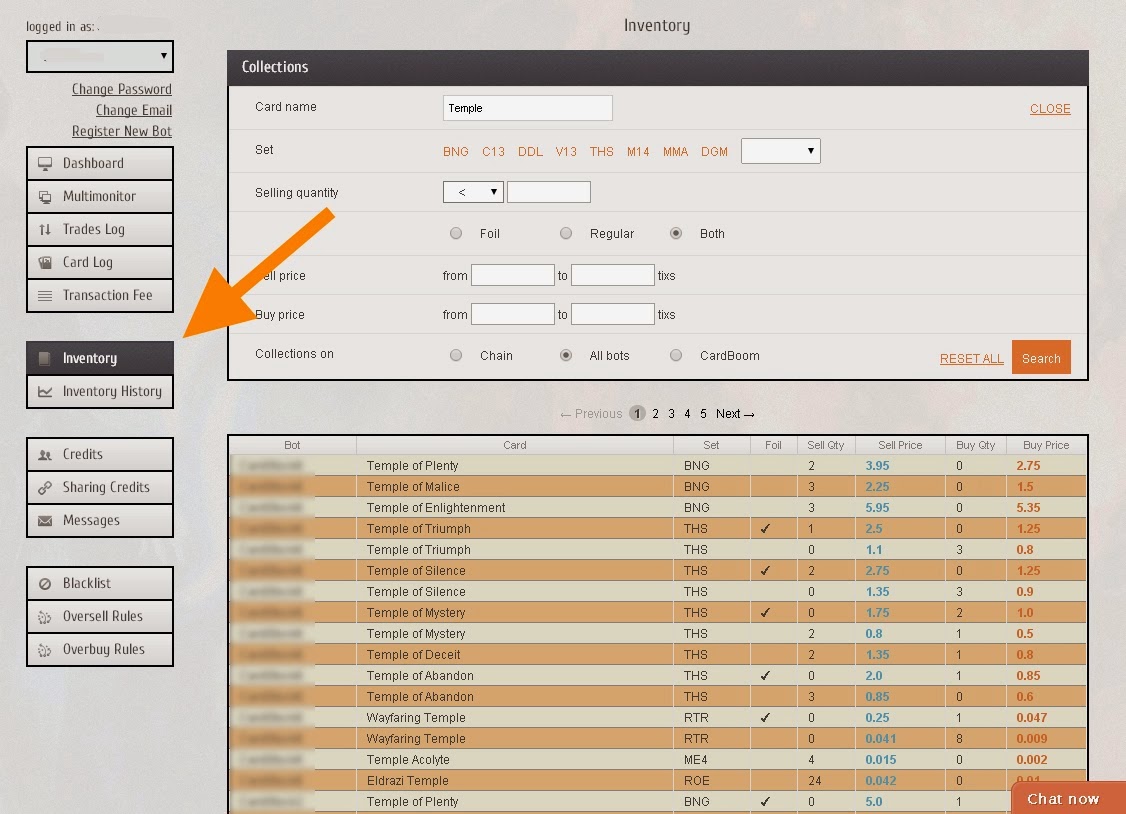
"Inventory" is still in beta and will be reworked during the coming weeks to offer a faster and a more complete experience, possibly integrated with the Trade Log and the Card Log. If you have any idea about what would you like to see there, please write us at staff@mtgolibrary.com or reach us on LiveChat.
Please note that Inventory works only with ML Bot greater than 6.66
Friday, February 28, 2014
MTGO Library Bot 6.62 - improved Oversell Protection
ML Bot 6.62 is a major update adding a new feature: the Oversell Protection "Customerless".
We introduced the Oversell Protection in version 6.46 (January 26th). Briefly summarizing, the oversell protection is a set of rules that apply to customers that buy more than "x" copies of a certain card in a 24 hour period. It can be useful to protect your bots from someone buying all the copies of a certain card (for example to speculate on it). A user buying all the copies of a card is not necessarily a bad thing, but if you want an always stocked chain this could be annoying, especially when the prices of the cards move fast (such as during the Release Events).
Now, what happens if a customer has many accounts and simply change them to circumvent the protection? This is where the new option "customerless" comes into play.
You can basically tell your bot to sell a maximum of "X" copies of a certain card in 24h, regardless of the customers. This helps, for example, if you mispriced a card or if a sudden market change increase the value of a card and you are now selling it for cheap money.
Just pay attention that this mode can reduce your trades, so you may want to use but not ABUSE it :-) Sometimes it is just good to sell a card for cheap money, take a small profit and rotate the inventory than keeping the card in stock in the hope to sell it at its maximum price.

ML Bot 6.62 fixes also a minor problem with the Classified Message, a problem introduced in 6.61. The bot could post wrong cards on the first message (just the first time, the other messages are fine).
We also fixed a login problem happening on Windows XP - the bot could not recognize the "disconnect" message during the login.
We introduced the Oversell Protection in version 6.46 (January 26th). Briefly summarizing, the oversell protection is a set of rules that apply to customers that buy more than "x" copies of a certain card in a 24 hour period. It can be useful to protect your bots from someone buying all the copies of a certain card (for example to speculate on it). A user buying all the copies of a card is not necessarily a bad thing, but if you want an always stocked chain this could be annoying, especially when the prices of the cards move fast (such as during the Release Events).
Now, what happens if a customer has many accounts and simply change them to circumvent the protection? This is where the new option "customerless" comes into play.
You can basically tell your bot to sell a maximum of "X" copies of a certain card in 24h, regardless of the customers. This helps, for example, if you mispriced a card or if a sudden market change increase the value of a card and you are now selling it for cheap money.
Just pay attention that this mode can reduce your trades, so you may want to use but not ABUSE it :-) Sometimes it is just good to sell a card for cheap money, take a small profit and rotate the inventory than keeping the card in stock in the hope to sell it at its maximum price.
ML Bot 6.62 fixes also a minor problem with the Classified Message, a problem introduced in 6.61. The bot could post wrong cards on the first message (just the first time, the other messages are fine).
We also fixed a login problem happening on Windows XP - the bot could not recognize the "disconnect" message during the login.
Sunday, January 26, 2014
MTGO Library Bot 6.46 - Oversell protection
ML Bot 6.46 is a major release, offering a numer of small bug fixes and bringing a new tool, the Oversell Protection.
What is it? The oversell protection is a set of rules that apply to customers that buy more than "x" copies of a certain card in a 24 hour period. While not everybody needs it, it can be useful to protect your bots from someone buying all the copies of a certain card (for example to speculate on it). A user buying all the copies of a card is not necessarily a bad thing, but if you want an always stocked chain this could be annoying, especially when the prices of the cards move fast (such as during the Release Events).
You can active the tool in the Online Control, clicking on the "Oversell Protection" button. There are several things you can do there: you can decide how to respond to an oversell attempt: you can deny the trade or you can increase the price of the card. You can do this for rarity and foilness, and choose the thresholds of cards and the increase in price.
The interface is easy use, but we are still working on it and will make it better. So far the oversell protections apply to all your bots - we plan to make it chain-wide and all-bots-wide to offer a deeper control.
As final note, with ML Bot 6.46 we changed the executable packer to decrease the size of the files. This is ok, save for AVG Free that detects the new executable ("LauncherGUI.exe") as a generic virus. We are still working on the issue and try to find out why. Other antivir are fine and do not raise any alarm, we think that AVG is tuned to detect a higher number of false positives than other antivir.
Note for the beta testers: this release, 6.46, is NOT the 6.46 you are using, it is slighly less. Your version already has the oversell protection.
 .
.
What is it? The oversell protection is a set of rules that apply to customers that buy more than "x" copies of a certain card in a 24 hour period. While not everybody needs it, it can be useful to protect your bots from someone buying all the copies of a certain card (for example to speculate on it). A user buying all the copies of a card is not necessarily a bad thing, but if you want an always stocked chain this could be annoying, especially when the prices of the cards move fast (such as during the Release Events).
You can active the tool in the Online Control, clicking on the "Oversell Protection" button. There are several things you can do there: you can decide how to respond to an oversell attempt: you can deny the trade or you can increase the price of the card. You can do this for rarity and foilness, and choose the thresholds of cards and the increase in price.
The interface is easy use, but we are still working on it and will make it better. So far the oversell protections apply to all your bots - we plan to make it chain-wide and all-bots-wide to offer a deeper control.
As final note, with ML Bot 6.46 we changed the executable packer to decrease the size of the files. This is ok, save for AVG Free that detects the new executable ("LauncherGUI.exe") as a generic virus. We are still working on the issue and try to find out why. Other antivir are fine and do not raise any alarm, we think that AVG is tuned to detect a higher number of false positives than other antivir.
Note for the beta testers: this release, 6.46, is NOT the 6.46 you are using, it is slighly less. Your version already has the oversell protection.
Subscribe to:
Posts (Atom)