Showing posts with label pricing. Show all posts

Sunday, September 18, 2016

Upcoming MTGO Library Improvements

I am excited to annouce MTGO Library will be making some major improvements in the upcoming months.  As I mentioned in a prior article, there will be a new price updater that will be launched in October. In the image below you see a work-in-progress preview, so don't take it as final.

In November there will be improvements to MTGO Wikiprice with increased search speeds, the grouping of reprinted cards into one search page (In other words, if want Tarmogoyf, you don't have to search 3 different sets), and possibly a universal credit system for all ML bots to share credits.

After Christmas / January 2017, a Webshop for Wikiprice will be launched.  The new Webshop will allow customers to purchase from any bot using paypal or credit card.  And then grab the cards on single bots, or on a wikiprice collector bot (so one trade).  The goal is to make Mtgo Wikiprice a better place to shop.


Thursday, September 8, 2016

New Pricing System Coming Soon

Mtgo Library is currently working on a major improvement to the background price updater that will be released in October.  It is a total rewrite of the current one with a more advanced algorithm. The new pricing system will be dynamic and will allow the bot to follow the market immediately with two extra controls based on current sales and inventory stock.  As always, Mtgo Library continues to make investments to keep their bots on the cutting-edge.

More details to come!


Thursday, November 12, 2015

Spike Protection Tool

Have you ever been in this situation: a card spikes in price, and your bot buys at the new high price just as the card drops back down? You end up losing money because your bot's been tricked by a temporary spike in value.
Spikes are quite common on MTGO and we know that they pose a big risk for botters.

To protect our customers, we are introducing the new “Spike Tool”.


The Spike Tool uses a heuristic to spot sudden increases in price on cards valued over .5 tix. When a card spikes in price, the bot will keep the buy price at the lower pre-spike price.
A similar safety net will be applied if a card spikes DOWN in price. The bot will keep the sell price at the higher pre-spike price.

The Spike Tool will be automatically activated on all bots starting today. We've initialized the tool with some light parameters. We recommend that you keep it active for the next few days and adjust it as needed.


Wednesday, November 26, 2014

Special Buddies, online

We are proud to announce the new Special Buddies tool, available on the Online Control Panel. It works exactly as the one on the "client bot", but it is centralized and it is shared among your bots. The old tool on the client bot will not be supported anymore.

The new Special Buddy tool is not active yet: to ease the transition, it will be activated 3rd December. Before that date you need to migrate your special buddies online.


We hope you will enjoy the new tool. Having it online means that you can easily adjust the prices on your smartphone even when not in front of the pc!

Tuesday, September 16, 2014

Pricelist "CardsMTGO.txt" format change

Later this week we will release a major bot update. We improved and recoded a number of things - a detailed article will follow.

Among the other changes, we changed the pricelist format. The current line format is:

000#0001#5DN#C#Abuna's Chant#0.017#0.026#0.005#0.008

the new format will be:

12345#12345#000#0001#5DN#C#Abuna's Chant#0.017#0.026#0.005#0.008

You have to do nothing, the bot will recognize and load automatically the new format. If you use custom tools to create your own CardsMTGO.txt, you may want to adhere at the new format.

Thursday, September 4, 2014

Online Price Editor

Let's pretend you are away from home, with no laptop, without your Magic Online tools, and you realize there is something wrong with your pricing and need to fix quickly. For example this weekend ONS fetch lands dropped drastically due to the annoucement of them being reprinted in Khans and if you didn't change your price quickly you would have bought them all at around 30-40 even though they are selling for about 30 now.

Before today, you couldn't do anything. You could just sit there and watch your bots burn your tickets.

Today we launch the online price editor so you can adjust your prices in few seconds from anywhere and deliver the updates to your bots, immediately. The editor is specifically designed for smartphone and tables, so you can use wherever you are.
You can access the editor from the Online Control Panel, after login, clicking on "Personal Price List" and then "Create a personal price list" (the blue button).


Saturday, May 24, 2014

WebShop APIs example usage

The following code snippet shows how to use the inventory api to populate a table of cards. It is a good starting point if you need to build you own views.


Thursday, May 22, 2014

WebShop APIs 2.0

Last week we released the WebShop APIs (http://mtgolibrary.blogspot.com/2014/05/introducing-webshop-apis.html) with the idea to ease the creation of webshops.You botters loved that and gave us many feedback, thank you :-), we did not expect such a warm welcome.

Yesterday we released "version 2.0" with the goal to simplify the usage. The most important API request, the Inventory one, has been rewritten and now contains plain card names and bot names instead of numerical identifiers. You don't need to build two tables to decode the correspondence with the real names.
The parameter of the request is no more "set_number" but directly the name of the set, for example THS or BNG.

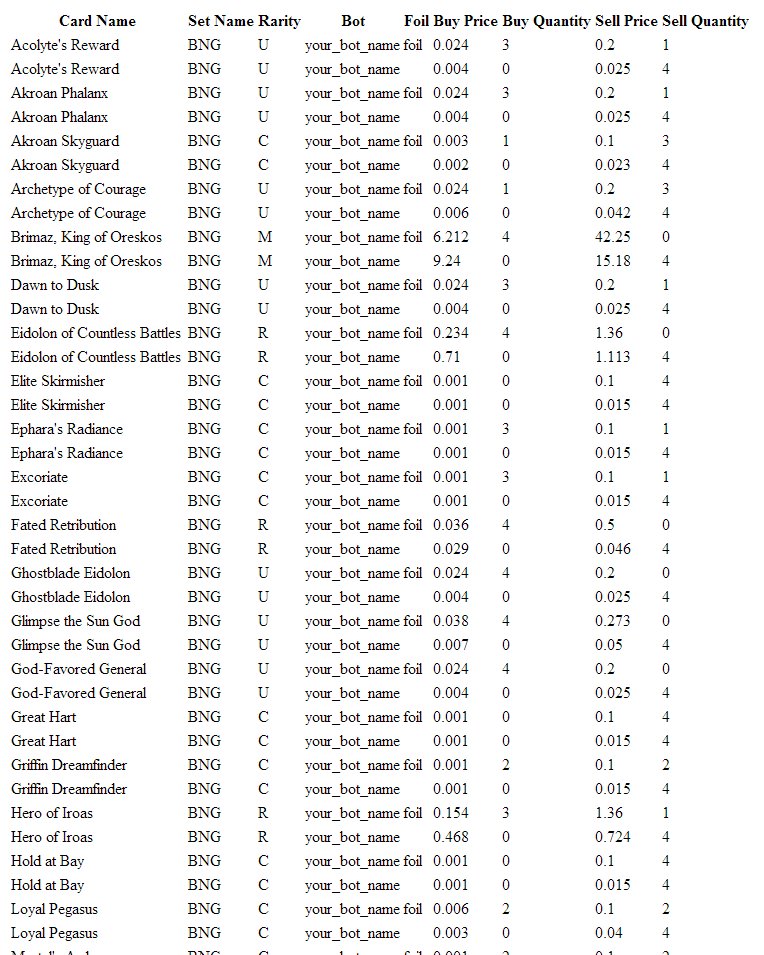
The result is a Json text, for example:

<...>
{"card_name":Eidolon+of+Countless+Battles,"set_name":BNG,"rarity":R,"bot":xxx,"foil":1,"buy_price":0.726,"buy_quantity":3,"sell_price":1.26,"sell_quantity":0},{"card_name":Elite+Skirmisher,"set_name":BNG,"rarity":C,"bot":yyy,"foil":0,"buy_price":0.003,"buy_quantity":3,"sell_price":0.017,"sell_quantity":0},
<...>


Monday, May 19, 2014

Introducing WebShop APIs

Yesterday we released the first version of the WebShop APIs, an Application Programming Interface to connect your webshop online with the bots.

Using the APIs you will be able to populate your collection in real time and sell cards even out of Magic Online, on your website, exactly as mtgotraders.com or cardbot do. Many botters already do this using unconventional solutions, for example parsing the file "cardsneededandcollection.txt" or parsing the .csv of the collections. WebShop APIs help simplify this and offer a solid core to build your online presence.

APIs are simple http get requests and the result is a text file formatted in Json, so you can easily parse it with one the many libraries available online - or you can parse it as a standard text file.

Please feel free to experiment with the APIs. If you are not a programmer and want to build your webshop, please contact us and our staff will help you.

Wednesday, April 23, 2014

MTGO Library Bot 6.83 - introducing "Profit Protection"

ML Bot 6.83 has just been released. There is nothing new here at a first sight, but it prepares the field for the "Profit Protection" tool we will introduce tomorrow!

Please stay tuned because this will be something big :-)


Sunday, April 20, 2014

Back on wikiprice...

Just like most bot owners, I have been feeling the less volume of trades and profits on my bot chain. I've decided to go back on Wikiprice to boost the volume/quantity of trades and gather new regulars.
After being nearly one year away from wikiprice, I haven't had any "terrible days" due to a pricing mistake or a bad price list; while this seems to be a clear win/win choice, it had its disadvantages...


Being away from wikiprice is a great way to hide your bot away from bad trades, specially if you are inexperienced on mtgo botting and unsure about prices. The problem is that you're also hidden from great opportunities too, from customers who don't mind paying a little bit extra to get all from the same chain to the ones that might get a great deal out of you (at your loss) but keep you on their buddy list, for future trades..(where you'll have the chance of getting your losses back).

Overall I think I've made the right choice in coming back... any thoughts?

Thursday, April 17, 2014

Wikiprice now showing chains!

Yesterday wikiprice was not working properly, online and offline, because we were deploying a new feature, the grouping by chain.

If a bot belongs to a chain, it will appear in blue with a little "+" sign on the left. Click it to expand the chain and get the details. This is useful because chains share the credits so you can shop in any of the grouped bots and your credit will follow you. This will also save vertical space on your screen so you can view more bots at the same time.

Enjoy!


Wednesday, March 26, 2014

Improved Inventory - Part II

This afternoon we deployed a major update to the Inventory (launched 16th March http://mtgolibrary.blogspot.com/2014/03/inventory.html and improved a first time 18th March http://mtgolibrary.blogspot.com/2014/03/improved-inventory.html).

Now all the cards are grouped - you can check the details by clicking on the name of a card and a submenu will open. The prices are grouped in brackets like [2.0 - 3.0] 2.7] where the first number is the minimum price among your bots, the second is the max and the third one is the weighted average.
Prices are grayed out if your don't own the card or you don'y buy it.


Sunday, March 16, 2014

Inventory

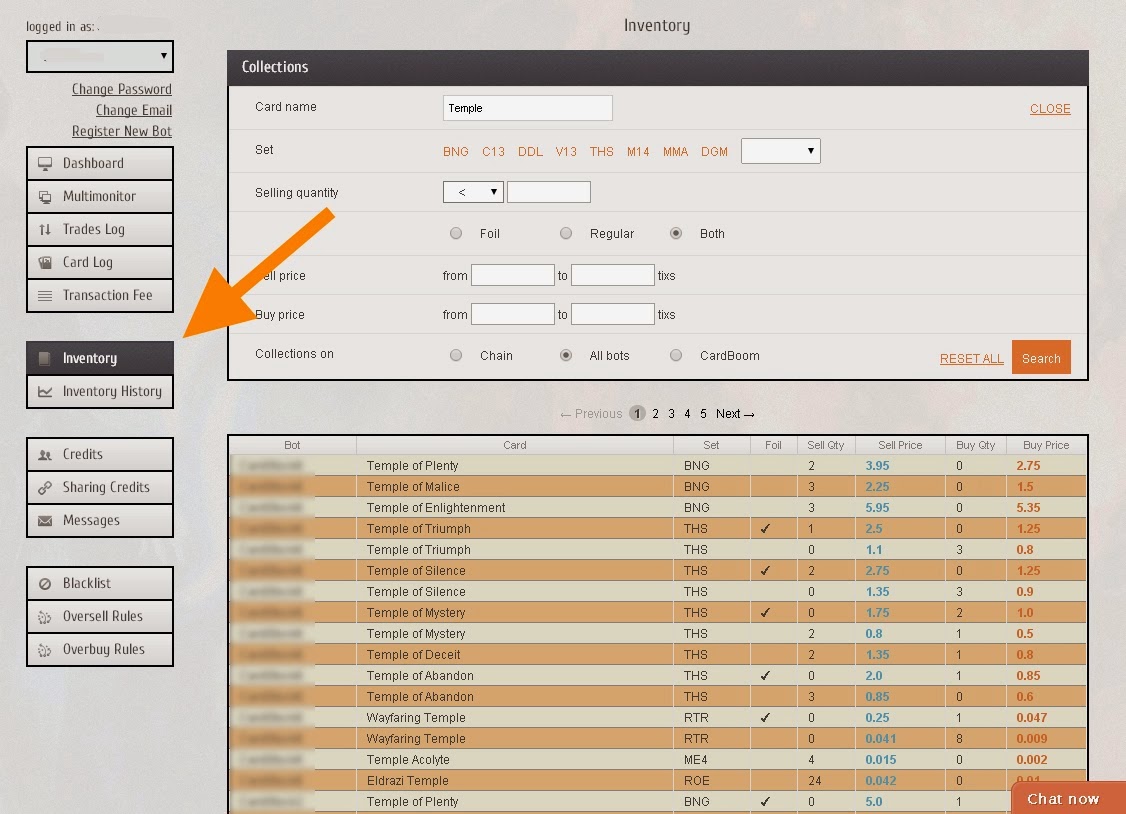
Yesterday we released a new feature available on the Online Control Panel, the "Inventory". It is a place where you can browse the inventory of your bots, search for cards and get their price. The idea is to know every item you have and where those items are located.

"Inventory" is still in beta and will be reworked during the coming weeks to offer a faster and a more complete experience, possibly integrated with the Trade Log and the Card Log. If you have any idea about what would you like to see there, please write us at staff@mtgolibrary.com or reach us on LiveChat.

Please note that Inventory works only with ML Bot greater than 6.66


Sunday, February 16, 2014

Wikiprice is currently experiencing issues

Wikiprice (http://mtgowikiprice.com/) is currently experiencing some issues and it is listing just few cards. We are working on the issue and hope to have everything up and running as usual in few hours


Tuesday, February 4, 2014

Improved Oversell Protection

We have just deployed an oversell protection improvement (see here for the original article).

The Oversell Protection let you choose the names of the bots that will be affected, as well the "width" of the oversell threshold: "4x of a card among all the bots", or "just among the chain?". You can now easily destroy a rule by clicking on the "delete" link or remove a single bot by clicking the "x" close to each name.

The concept of "active/unactive" rule has also been removed and now all the listed rules are active - this should make the page easier to read, especially when multiple rules are created. Having the bot name listed makes also clear who is affected, and by which rules.


Monday, January 27, 2014

Wikiprice is now on a new server

Recently we had some problems with wikiprice, mainly due to the computational power of the server and the heavy traffic. Today we had to keep wikiprice down for 8 hours while we were migrating to a new server.

We moved wikiprice to a new server that doubles the amount of ram and uses ssd hard drives. We also optimized the code. So: new server, more ram, ssd hard drive, code optimization: all should result in a very stable wikiprice with an uptime close to 100%.

The first thing you'll see it that the pages load faster. Oh, we also changed the graphs a bit, and added a login section for a plethora of things we'll add in the future


Sunday, January 26, 2014

MTGO Library Bot 6.46 - Oversell protection

ML Bot 6.46 is a major release, offering a numer of small bug fixes and bringing a new tool, the Oversell Protection.

What is it? The oversell protection is a set of rules that apply to customers that buy more than "x" copies of a certain card in a 24 hour period. While not everybody needs it, it can be useful to protect your bots from someone buying all the copies of a certain card (for example to speculate on it). A user buying all the copies of a card is not necessarily a bad thing, but if you want an always stocked chain this could be annoying, especially when the prices of the cards move fast (such as during the Release Events).

You can active the tool in the Online Control, clicking on the "Oversell Protection" button. There are several things you can do there: you can decide how to respond to an oversell attempt: you can deny the trade or you can increase the price of the card. You can do this for rarity and foilness, and choose the thresholds of cards and the increase in price.

The interface is easy use, but we are still working on it and will make it better. So far the oversell protections apply to all your bots - we plan to make it chain-wide and all-bots-wide to offer a deeper control.

As final note, with ML Bot 6.46 we changed the executable packer to decrease the size of the files. This is ok, save for AVG Free that detects the new executable ("LauncherGUI.exe") as a generic virus. We are still working on the issue and try to find out why. Other antivir are fine and do not raise any alarm, we think that AVG is tuned to detect a higher number of false positives than other antivir.

Note for the beta testers: this release, 6.46, is NOT the 6.46 you are using, it is slighly less. Your version already has the oversell protection.

.


Approach MTGO Finance like Warren Buffet

If you have been living under a rock, you may never have heard of the most successful investor in the world: Mr Warren Buffet, 83 years old right now.

Here's how happy investing money makes him.
This guy has managed to get 20% a year on any money he has invested - over a long period of time. In the world of investing money, he has no match.

Based on a long article in the Swedish financial magazine Aktiespararen, I have tried to figure out how mr Buffet would approach MTGO Finance.

Here are some of his principles and how they may apply to Magic Online:
  • Evaluate the company, not the market:  Think about the deck the card you are evaluating goes into. How will this deck do in the future? What will the demand be? Can the card be reprinted?
  • Choose the right company and act as an owner: If you invest in cards, make sure you have played them. Be aware of the interactions of the card so you can properly evaluate if a card is overshadowed by a newer card. If you deep on a card, make sure you play it. Constantly.
  • Think about the difference between a card's price and its value: Rageblood Shaman spiked on MTGO as it has a lot of value if a Minotaur deck becomes a viable (even tier 3) Standard strategy. The card has a lot of potential value but had a very low price. If you managed to sell in time, you could have earned 1000% on the first spike (5 to 50 cents) .There may be future spikes.
  • Buy cheap and keep for a long time: This may apply more to stock that actually on the average have positive expected value (EV). Magic cards do not. BUT overall MTGO speculators are too shortsighted. Act on the major trends - such as PTQ season and not fancy guesses about the future. (Check out my Seasonal Trading video - link below).
  • Trade as little as possible: Warren wants to avoid fees and you should also act to avoid fees! Do not give the bots 15-50% every time. Sell to humans. Get your own bot from mtgolibrary (you only pay when you sell!). You can trade a lot if you do not lose rake every time you do. Be aware of fees.
  • Invest deeply in a few companies: Specialize. Choose a format or a set and learn everything about it. Do not try to speculate in all MTGO cards. Avoid more complicated areas like foils or promo cards until you are ready. We have all tried to speculate in too many areas. Consider how many speculators are trying to break Standard prices - maybe you should be the one that ignores the current set?
  • Never borrow money for investments: If you borrow money to invest in MTGO cards, you are adding even more risk to a market that already has huge risk. Do not do it. I do not think there are many speculators that do this but if you even think about it - DON'T!
  • Act rationally, not emotionally: Be aware of yourself and your emotions. You are your own worst enemy. Do you have pet cards? Are you attached to an investment and can't sell it to cut your losses? Learn about yourself. Know yourself.
  • Be aware of interest on interest: There is probably a situation where you can get interest on interest on MTGO but I fail to think of one right now.
  • Learn from your mistakes: When you have to sell with a loss think about why this happened. What could have turned out differently? Why didn't it? Did you make the right call and then something bad happened (like a sudden reprint, for example) ? How can you avoid this situation in the future?
  • Take your own path: MTGO finance is different because most of the people on the market are players, not investors. Even so is it really your best option to check Reddit and Twitter and do what Marcel does? Or can you find your own niche?

Thinking like this made Warren Buffet the fourth richest man in the world:

http://en.wikipedia.org/wiki/Forbes_list_of_billionaires#2013_Top_10

He was beaten only by three guys who built worldwide companies. It is hard to approach MTGO Finance like Bill Gates, btw.

Some of my other MTGO Finance material:

Contact Info:
YouTube: MagicGatheringStrat
Web: mtgostrat.com
TwitchTV: twitchtv.com/MagicGatheringStrat
Bot:  mtgostrat. Show your support

Wednesday, January 8, 2014

Proft Stats for single bot, chain and all bots

Recently we introduced the Stats Block and the Profit Graph.  http://mtgolibrary.blogspot.com/2013/12/profit-number-and-value-of-trades.html

We have now enhanced them to include the data from all your bots and from the bots in the same sharing credit chain. By default the Dashboard shows the data for "all" bots. Just click on the links on the right (orange arrows) to navigate the other datasets.


The "single bot" is the bot you are logged in with. You can change that bot using the dropdown menu on the left.  "All bots" refers simply to all your bots, without any distinction, while "chain" is the set of bots sharing credits with the current bot (as definied in the "Sharing Credit" Panel)